
Starting a game
Punigo's browser version lets you play Go on small boards against the AI or a friend, free and without signing up. This guide walks through a game from start to finish.
Before the game
Press “Play in your browser” on the home page to open the game settings. There are five things to choose; when you are ready, press “Play”.
| Setting | Options | For first-timers |
|---|---|---|
| Opponent | AI / Two players | Start with the AI. In two-player mode you take turns on one screen. |
| Board Size | 5×5, 6×6, 7×7, 8×8, 9×9 (the number of lines each way) | Begin on 5×5 and move up as you get comfortable. |
| AI Strength | 40 kyu to 1 kyu, then 1 dan to 3 dan | The smaller the kyu number, the stronger; 1 dan comes after 1 kyu. 40 kyu is the gentlest setting. |
| Your Stone | Black (first) / White (second) | Black moves first. If you pick White, the AI opens. |
| Komi | None (0) to 9, in steps of 0.5 | Leave it at none to begin with. |
On your first visit the settings are 5×5, 40 kyu, Black and no komi. If you are new to Go, just play a game with these settings. The center of the board is a good first move (see “Tips to win on 5×5”). Your choices are saved in the browser, so they'll still be set next time.
The first game against the AI takes a moment to start because the AI data has to download once. Two-player games start right away.
What is komi?
Black has a small advantage because it moves first. Komi is a number added to White's stone count at the end to make up for that. With a komi of 6.5, for example, Black needs at least 7 more stones than White to win. A komi ending in .5 means there can be no draw.
During the game
Tap or click a point where two lines cross (an intersection) to place a stone there. If you tap a point where you are not allowed to play, the board shakes and tells you why. The illegal points are explained in “The four rules in detail”.
The screen shows how many stones Black and White currently have. Komi is already added to White's number, so you can compare the two to see who has more right now. Mid-game counts are taken before territory is filled, though, so they don't tell you who is winning.
There are three buttons you can use during a game:
- Pass: give up your turn without playing. Use it once you have filled your territory and only moves that would hurt you are left.
- Resign: end the game as a loss.
- New Match: leave the current game and start a new one.
The browser version has no undo and no hints, so think each move through. If you reload the page in the middle of a game, you can continue where you were, as long as it is the same tab.
Read the stone faces
Punigo's stones have faces. Stones of the same color that touch up, down, left or right join into one group. The faces tell you at a glance whether a group is in danger:
- A stone that can be captured with one more move (a stone in atari) looks worried.
- A stone that has an opponent's stone in atari looks confident.
- A group that can no longer be captured, whatever the opponent does, has a big happy smile and pink cheeks.
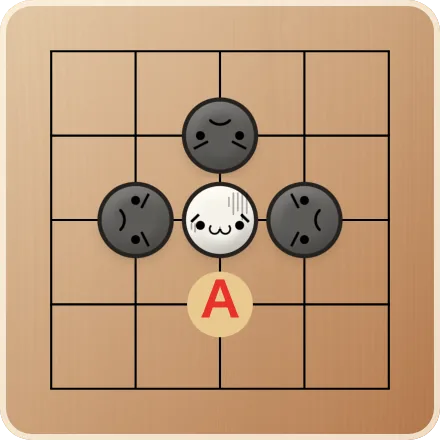
Capturing is explained in “The four rules in detail”, and groups that can't be captured (eyes) in “Living and dead stones”.
How the game ends
When Black and White pass one after the other, the game is over. The stones on the board are counted, komi is added to White, and whoever has more wins.
Important: empty points don't count, so before the game ends, fill your territory (the area your stones surround) with your own stones. The browser version does not do this for you. But don't fill all of it, or your opponent can capture the group: leave two separate empty points (eyes) inside it, then pass. Opponent stones left inside your territory are not removed just because they are surrounded; they count for your opponent, so capture them before you pass. “Living and dead stones” explains why.
If the AI passes first and you pass straight back, the game ends right there. Unfilled territory doesn't count, so finish filling yours before you pass.
On the other hand, if you pass but the AI still thinks there are moves worth playing, it keeps playing. When that happens, look over the board again for points you can still fill and for empty points along the border with your opponent.
After a win: the “Next game”
When you beat the AI, the result screen offers a “Next game” with a slightly stronger opponent. Accept it after each win and you take on gradually stronger opponents, from 40 kyu on 5×5 all the way to 3 dan on 9×9.
| Board | AI strength (goes up with each win) |
|---|---|
| 5×5 | 40 kyu → 30 kyu → 20 kyu |
| 6×6 | 20 kyu → 15 kyu |
| 7×7 | 15 kyu → 12 kyu |
| 8×8 | 12 kyu → 10 kyu |
| 9×9 | 10 kyu → 8 kyu → 6 kyu → 4 kyu → 2 kyu → 1 kyu → 1 dan → 2 dan → 3 dan |
Win at the last strength listed for a board and you move up to the next board size at the same strength. 3 dan on 9×9 is the strongest setting in the browser version.
Keep and share your games
From the result screen you can share the game on X, Facebook, WhatsApp and more. Opening the shared link replays the game move by move. The whole record is stored inside the link, so as long as you keep the link you can watch the game again. You can also copy the link, or copy the record in SGF format for other Go software.
To replay an SGF file of your own, use “Import SGF” in the game screen's menu (records from 5×5 to 9×9 are supported).
Other languages
The browser version is available in Japanese, English, Simplified Chinese, Traditional Chinese and Korean. Choosing a language switches you to that language's pages.